(5 Flippers)
from Fr. Frog!
(5 Flippers)
from Fr. Frog! The "gun handling" part of the Modern Technique's triad of marksmanship, mindset, and gun handling includes not only knowing how to operate and maintain your firearms safely and efficiently but also knowledge of just how all parts of the "system" work. While a shottist doesn't need to have a degree in the subject, knowing what goes on when you press the trigger contributes to better performance on your part. This page and its related pages, while not a complete course on the subject, are designed to present a good basic foundation in the subject, generate some questions, and thus hopefully improve your shooting. If you find them useful or informative please drop me a line by clicking here and let me know.
NOTE: I previously used some special characters from the Wingdings and Symbols font sets. However, most standards compliant browsers no longer support these fonts. I have attempted to remove them and replace them with the appropriate text. If you find an odd character in the text (most likely the letter "U" (formerly a small triangle), or an odd ± where it shouldn't be, or any other odd character please email me by clicking here and let me know the page and location on the page.
If you are a new reader, I suggest you read this entire page first before continuing.
If you are a repeat visitor you can click here to jump to the menu.
The science of projectiles in motion is called "ballistics," and the science of ballistics as related to firearms is really divided into three separate but inter-related fields:
Internal Ballistics - The study of what happens inside of the firearm.
External Ballistics - The study of what happens during the bullet's flight.
Terminal Ballistics - The study of what happens when the projectile strikes the target.
Internal ballistics are important to the manufacturer.
External ballistics are important to the to gun writers, long range shooters, and the great unwashed.
Terminal ballistics are what is important to you, me, and us."
Before we start, a brief (but
informative) commercial....
(or click here to
jump to the menu--but the info below will be of great interest too)
Ballistics Software
NOTE: This is for information only as RSI has shut
down due to age and health issues.
There are lots of "ballistics" programs on the
market ranging from outright junk to fairly decent and with prices ranging from free to
$150 or more. With very few exceptions you pretty much get what you pay for.
Most of the free or inexpensive (and even some expensive ones) are
basically useless and give very questionable results. The "gold standard" for a long time has been ShootingLab, from
RSI. ShootingLab is available for a 30 day free evaluation
download. It is
available for XP-SP2+ / Vista / 7, 8, and 10. It is as far as I can determine it is
the only program whose ballistics results match actual radar range data at all
ranges
ShootingLab is a very powerful and full featured package, not just a ballistics program. It uses modern drag function modeling techniques developed by the U.S. Army's Ballistic Research Laboratory in Aberdeen, MD, instead of the 100 year old Ingalls/Mayevski formula that do not accurately describe the characteristics of modern pointed bullets. (See a discussion of this later on in these pages.) As would be expected it allows you to do trajectory analysis, including the effects of shooting at uphill or downhill angles, the effect of canting the rifle (using the proper rotation around the line of sight and not around the center of the bore), bullet coefficient of drag analysis, and spin drift, coriolis effect, and much more. It will even generate custom "DRG" files for use in your hand held computer.
No other commercial shooting software has comparable exterior ballistics modeling capabilities... and exterior ballistics is less than 10% of the program!
In addition, if you reload, it will help analyze components and keep you organized. If you hunt, it will help select calibers, ammo and set gun sights. If you compete, it will help analyze and improve your shooting. It's target analysis function is especially nifty. After calibrating your computer's monitor you can simply place your target on the monitor and using a sizeable bullet hole cursor through the holes in the target analyze group size and other relevant data.
Information only needs to be entered one time to be accessed throughout the program with a simple mouse click. And, it's design is flexible, so you can customize the program for your own personal shooting needs.
Locations within the ShootingLab program can be opened from a navigation palette, menu or keyboard commands. Data is linked between the various segments to reduce entry effort and allow quick retrieval via customizable pop-up menus. There are also general utilities that may be accessed from a "Main Lab Menu" anywhere in the program.
| User Interface | Features |
|
|
For detailed information on ShootingLab 4.8 see http://www.shootingsoftware.com/ballistics.htm . While you can download a 30 day evaluation copy for Windows (~15 MB) from: http://www.shootingsoftware.com/ftp.htm as well as the complete documentation I suggest that you simply order a live copy and start using it.
As with any full featured piece of software there is a learning curve, but
it is not difficult, and the effort is well
worth it in my opinion. If you
haven't read the manual, do so before complaining or bad mouthing the program.
The licensed version of this package is priced at $99.95 plus shipping or as low as $59.95 if you buy a CED Millennium Chronograph or PressureTrace at the same time. I have served as a beta tester and consultant for ShootingLab and it is VERY VERY good. Shooting Lab replaced all of my other ballistics and shooting related software some time ago, with the exception of some custom stuff that I wrote myself for special purposes. If you are serious about shooting and investigating ballistics this is the package you want. Jim is very conscientious about fixing any bugs that are reported, and upgrades are free. The current version is 4.8.9 - 2018-10-23.
While you can buy it from several on-line sources, if you buy it directly from RSI (http://www.shootingsoftware.com) you are guaranteed the latest version right off the bat. Tell Jim I sent you. (No, I don't get any kick backs.)
This one
gets
(5 Flippers)
from Fr. Frog!
WARNING
It has been brought to my attention that
there is a password crack for ShootingLab floating around.
Not only is it for a older version but it contains a rather nasty
virus. You have been warned.
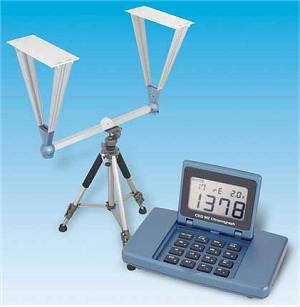
Chronographs
The best conventional chronograph on the market in in my opinion, and the opinion of
many, has been the CED Millennium. Now its new version, the CED Millennium II, carries on that status. It is
a very accurate and consistent unit that far surpass other consumer
chronographs. It sells for $199.00. It is extremely accurate and stable, and can be fitted with infra-red
sensors which will "see" bullets under conditions (including total
darkness) that would fail on other chronographs. It has a large, easy to
read display, non volatile memory (saves all data even when you shut it off or
the battery is removed so
you can take the unit home and still have the data), and it interfaces with
ShootingLab on your PC or laptop via a USB cable so you can accurately develop
ballistics tables. The
CED Millenium is used by US Secret Service, Canadian Special Ops units, USMC, California Bureau of
Prisons, Aberdeen Proving Grounds, ATK, and many others. It is also the
official chronograph of IPSC/USPSA.
| User Interface | Features |
|
|
The IR Upgrade kit includes replacement side leg supports, diffusers and a power converter for 110/230 v. AC. An NiMH battery pack with 8 hour rating and charger is available for total portability, but many users simply utilize a "gel-cell" 12 v battery commonly used on off-road vehicles. The IR sensors look nearly the same as the standard screens. Two of the four side supports have wire leads, contacts and power jacks molded into the plastic. The replacement diffusers have a row of IR emitters that shine downward and two LED's indicating battery condition or power status. Using the IR option the Millennium will work under any lighting condition, and I've chronographed in complete darkness to test them and every shot was properly recorded.. Unlike "visible" light systems, the IR illumination emitted from the new CED IR option is not visible to the human eye so it will not alter your sight picture when shooting indoors
Any camera tripod will work with the Millennium. However; inexpensive tripods with plastic heads wobble from big bore muzzle blast which can contribute to errors. Use a quality tripod with a metal head, an elevation crank and quick detachable camera block. The Velabon model 450 or 550 is such a tripod and should be available at most good camera shops or online for about $75. You may also find a good new and used and sturdy tripod for as little as $30 if you hunt around.
Users of any brand chronograph (including CED) can click here for some tips and tricks and information on solutions for various chronographing problems.
With the included PC USB cable and CEDM Data Collector Utility you can download velocities directly to your personal computer. Simply plug the chronograph directly into a USB port, turn the Millennium on, click the Data Collector's download button, then the "PR/PC" key on the Millennium. In a few seconds the velocities stored in the Millennium's memory have been downloaded so you can store, print or edit the information or import it into ShootingLab
If you do a little careful research on
performance and features you will find that the CED Millennium chronographs are
by far the best units out there. But you may have to search hard as there
is little real information on most other manufacturer's sites. This
chronograph gets
(5 Flippers)
from Fr. Frog!
A Note About the Oehler 35/35P
There are some folks out there who are seriously and maybe even obsessively hung up on the Oehler 35/35P chronographs (the 35P had a printer) even to the point of recommending that people should find and buy old 35s rather than newer units Before Oehler dropped it, the 35 series was a good chronograph in its day, but it is old technology and has been superceded by modern electronics in accuracy, stability, easier to use features including a large easy to read display, and functionality.
The CED Millenium II runs a 48 MHz chipset, not a 4.0 MHz. like the Oehler, which also used a lot of analog technology. Oehler's "proof screen" was more of a marketing ploy than a necessity as all it does is measure the velocity twice and cries "tilt if there is a specified discrepancy between the two. Bad shots are easily detected without the "proof screen."
Modern sensor technology used on the CED is way ahead of the original Oehler screens both in sensitivity, reading area and freedom from interference and they will work in a wider variation of lighting conditions than any other brand. In fact Oehler apparently modified their screen mechanical design to effectively duplicate the CED design for better field of view and lighting error handling. The CED also offers an optional battery powered true IR head set that works in complete darkness or conditions previously impossible to shoot under..
CED is now the official chronograph for all sanctioned handgun competitions from IPSC to SSAS. It has replaced the 35 due to it's ability to get consistent readings despite changing lighting conditions, especially when equipped with the IR head option.
With today's technology the 35P with its printer is even more of an anachronism since the use of non-volatile memory allows you to save the data from 500 strings (2000 shots) and to then download the data to your PC, to ShootingLab software, or to print it at home without the bother of lugging obsolete, battery sucking printer technology.
From a historical perspective Ken Oehler's 35 was the premier product of its day and deserved support but there is a time when one must recognize technology marches on and a product becomes obsolete. No longer in being in production might be a starting clue. Some still love the Studebaker as well but the appreciation should be historical. The Studebaker was a phenomenal car with pioneering technology but is no longer being made. Should one recommend a Studebaker over all other cars today?
Oehler recently (2010) announced a very limited run of the original 35P chronographs with 4 foot rail and accessories for $575 (!!) plus shipping
If you own a 35, and it is working for you, and you don't need the features of a newer chronograph, run it until it quits. I would however, never suggest someone without a chronograph hunt for an old used 35 or spend close to $600 for older technology. That's just over the top and analogous to telling someone to hunt for and use a Studebaker as their only car.
Other Chronographs
Besides conventional (screen based) chronographs there are now two alternatives. The first, the $399 "MagnetoSpeed" chronograph, uses an induction coil mounted at the muzzle to measure velocity and the second is the just released LabRadar, doppler radar unit.
The MagnetoSpeed unit has been reported as having some accuracy issues and is not well suited to firearms with muzzlebreaks that have any downward blast It can also effect barrel harmonics, point of impact, and accuracy. It can't be used with autopistols.
The $600 LabRadar unit and while quite nifty is appears to have several limitations including low sensitivity and reading range with small (.22 - 24 caliber projectiles) and the need to have a clear down range area with nothing sticking up near the bullet's path and it also appears that a high berm down range (even at 100 yards) can interfere with operation. The screen is also very difficult to read in bright light and the setup procedure is not intuitive. ShootingLab software is currently being modified to handle its output and automatically generate BCs. I will post more information as it becomes available. RSI's website (www.shootingsoftware.com) has an unbiased discussion of the LabRadar unit.
Pressure Measurement
NOTE: This is for information only as RSI has shut
down due to age and health issues.
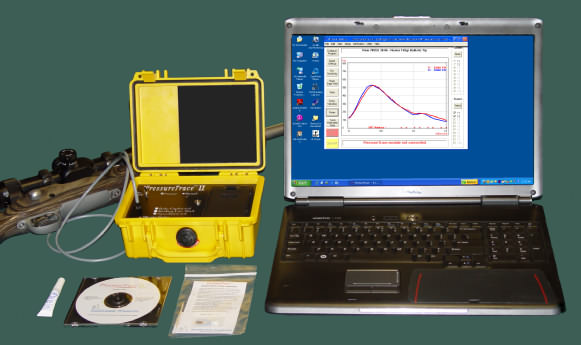
RSI also builds and sells a tool for pressure measurement. Called PressureTrace II TM it will allow you to capture the changes to pressure inside your rifle's chamber in real time and display a pressure curve in psi on your computer after each shot via a BlueTooth wireless connection and software. (If your PC/laptop doesn't have a built in Bluetooth and inexpensive BlueTooth adapter can be added to your USB port for about $10.) Because of the device's high sampling rate things are visible that are not detectable by other units and what you learn may surprise you. It can be used on any firearm where the area over the chamber or case mouth is accessible and the operating mechanism won't hit the sensor. For more details go to http://www.shootingsoftware.com/pressure.htm.
I have worked with RSI on this unit's development and personally use it--and it is VERY neat. Unlike the old (and no longer available) Oehler M43 Ballistics Lab pressure unit which attempts to equate the pressures obtained in your gun to what would be obtained by firing that load in a SAAMI specification pressure barrel, PressureTrace gives the actual psi readings generated in your gun--a much more useful measurement. The Oehler readings are higher in most cases than the actual pressures generated in the gun. Oehler apparently included this quirk because their idea was to sell the units to commercial users who could then develop loading data traceable to SAAMI data for liability reasons.
There is a learning curve (this is a precision instrument),
and it requires you to have basic computer skills. It comes with a
excellent manual that explains things-so READ IT.
This is the only only device available to the reloader that
gives actual pressure measurement and really lets you see what is
happening. It is currently being used by numerous ammunition companies and
laboratories world wide. This
unit gets
(5 Flippers)
from Fr. Frog!
|
|
|
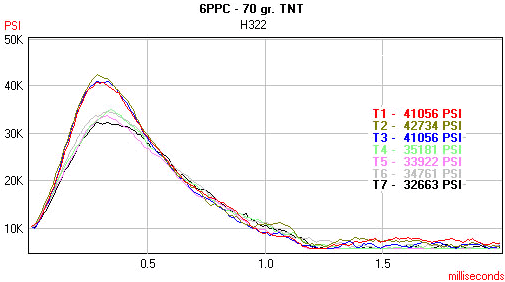
Typical PT output - Note
the trace detail. The lower |
If you want further information on any of these products you can contact Jim Ristow at:
Recreational Software, Inc.
info(at)shootingsoftware(dot)com
1-928-634-8028
While you can purchase the individual
products, you can purchase the ShootingLab software, the CED II chronograph, and
PressureTrace as a bundle
which will save you money and you will have a complete ballistics laboratory
the equal of many sophisticated commercial labs
Please tell him Fr.
Frog referred you, especially if you order anything from him.
(I don't get any kick-backs, he just wants to know
who referred you.)
Additional Sources For Information On Shooting
RSI Technical Information
For a really good source of additional information on various shooting related subjects point your browser to Jim Ristow's technical information site at:
http://www.shootingsoftware.com/tech.htm
(Opens a new browser window)
There is a wealth of information on all kinds of shooting related subjects on his pages. Among the article on his site are:
Ballistic Coefficients & Ballistics Software - A little history and exterior ballistics theory and why you should calculate your own B.C.'s to get the most from software. Much of the information about external ballistics theory on my pages came from this article with Jim's kind permission..
Load Density & Accuracy - Some interior ballistics theory applied to load density & how it can be used to select promising powder charges.
Target Analysis - Various ways to measure targets and how they are best used using targets to diagnose load or mechanical problems.
Scopes & Boresight Tricks - The proper way to mount scopes and how to get the most from an optical boresight.
Sight Cant - Some things you "CANT" ignore.
Moly Coating Technology - A great article by Parsec Engineering about Moly bullets, different types of moly, cause of caking, etc.
Chronograph Usage - A short discussion about using a chronograph to identify "Velocity Nodes" for your rifle.
Firearms Forensics
Forensics, or the study of firearms markings and residues is a subject that is of interest to many who study ballistics. If you have an interest in the field of forensics check these out.
Association of Firearms and
Toolmark Examiners
- www.afte.org
FBI Firearms and Toolmarks Lab
- http://www.fbi.gov/about-us/lab/scientific-analysis/fire_tool
Forensic Firearms page of Dr.
J. K. Sinha
- http://forensicfirearmidentification.com/
International
Ammunition Association
- www.cartridgecollectors.org
International Association
for Identification
- www.theiai.org/
National Integrated Ballistic
Information Network (ATF)
- http://www.nibin.gov/
Scott Doyle's Forensics
- www.firearmsid.com
The Forensic Panel Letter -
www.forensicpanel.com/media_center/the_forensic_echo.html
OK. Now Let's Begin Our Study (Finally!)
The following pages will help to give you a basic education in the subject of ballistics.
There is a lot of information on these pages so take your time and browse them all, or print them out. (Landscape orientation works best.) Select the area you would like to learn more about. I strongly suggest reading them in order.
| Internal Ballistics | External Ballistics | Zeroing | Range Estimation |
| What happens inside the firearm | The bullet's flight | Setting things up to hit where you aim and to do it efficiently | Figuring out just how far away things really are |
| Terminal Ballistics | Rifle Power | Load Development | Making Ballistic Gelatin |
| The bullet's impact Warning This page contains 12 large images and may take a while to load with a slow connection. |
Some thoughts on the subject of the "power" of the rifle |
A short discourse on the best way to develop a load for your firearm. |
The proper procedures for making and using 10% ballistic gelatin blocks for testing bullets and developing wound profiles |
| Ballistic Coefficient Tables | Advanced Reading | Misc. Questions and Answers |
|
| A fairly up-to-date (2/14/12) collection of published BCs from various commercial sources in Excel spreadsheet form | These references may be of interest to you, but beware, heavy on the math. | Random topics related to shooting in Q&A format. Check these out. You |
|
A NOTE ABOUT BALLISTIC INQUIRIES
I frequently get requests for a ballistics runs for a particular load. I will be glad to do a run or two for you but please note that you must supply the following data.
Bullet brand, weight, and type or name
Muzzle velocity. (Unless you know this I can only guess from loading data and that can be off by quite a lot from the real world)
Distance from center of bore to the center of your scope tube (or to the top of the front sight for iron sighted firearms)
The distance you want for a zero. (If not supplied I will send data for the optimum zero for your load) based on a 6" diameter vital zone
If you want additional runs there will be a $2.00 fee per run for such work.
Email me by clicking here.
| Back to Modern Technique of the Rifle | Back to Fr. Frogs Home Page |

Updated 2024-11-01